YOUR AI PERSONAL TRAINER
An AI trainer writes your gym plan
and suggests your next weight.
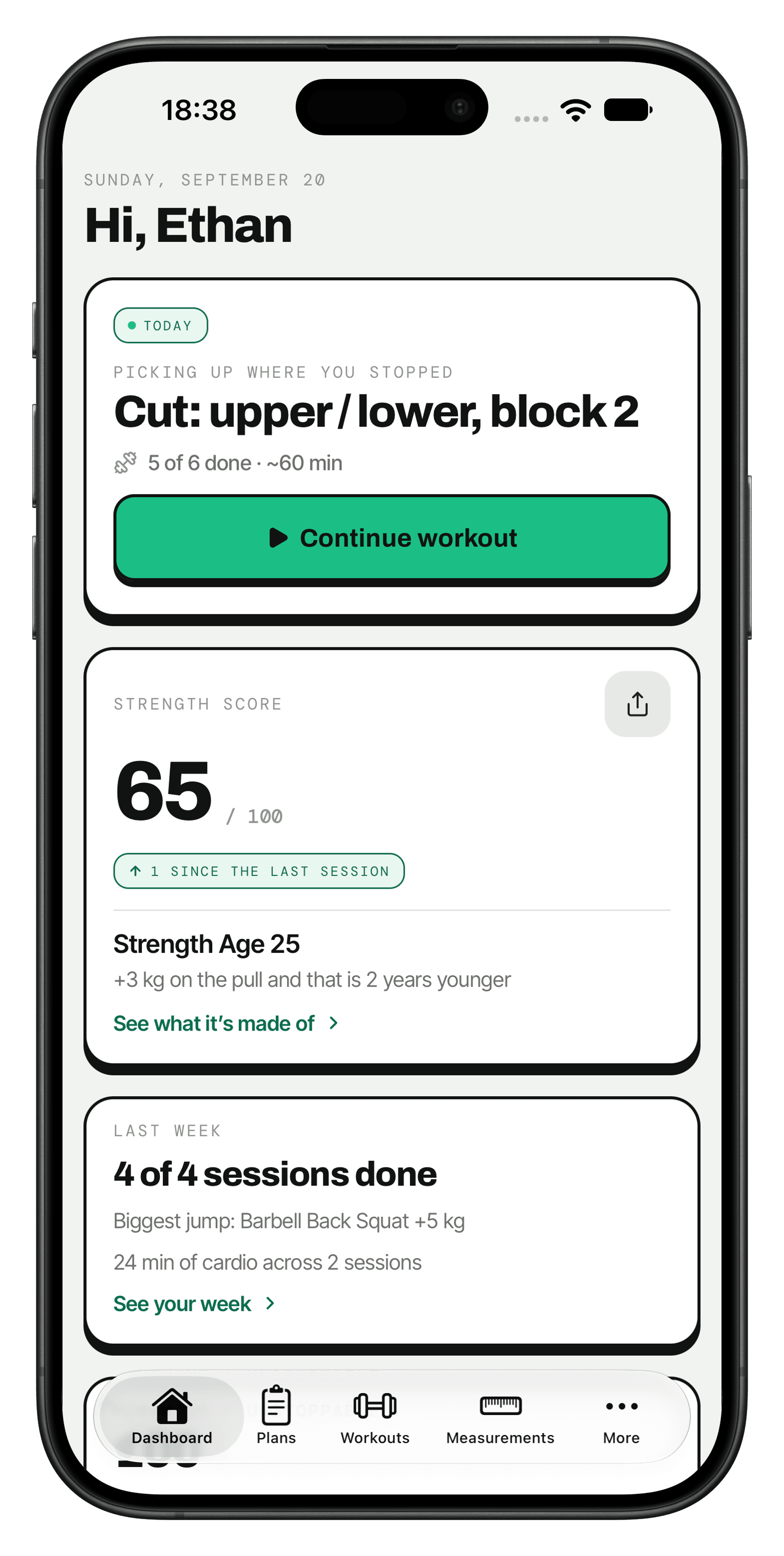
Answer 14 questions about your goal, the days you have free, your equipment and anything that hurts. You get a plan for the next 4 to 12 weeks. From your second session, Trackist suggests what to put on the bar, and the plan changes when something hurts or training stays too hard.


01 — Why it stalled
Training every week and still stuck?
You turn up and you do the work. The plan is what stopped moving.
01
The plan from January
You wrote the split in January and it still runs in June. Same weight on the bar, same reps, month after month.
02
A log nobody reads
Your sets sit in a notebook or a notes app. Nobody looks at them and decides what comes next.
03
A sore shoulder, a lost week
Your shoulder hurts on the bench, so you skip pressing. Then the rest of the week falls apart.
A good trainer adds weight when they see you can take it. They swap the exercise that hurts. Every 4 to 12 weeks, they write a new plan. Trackist does the same.
02 — Is this you
You train when you can,
with the kit you have.
Pick the days you can train and the equipment you can reach. The plan fits around both.
THE WEEK
Three days a week is all you have
Pick how many days you train and which ones. Your training sessions go on the days you picked.
THE GEAR
Your gym is a rack and two dumbbells
Tick the equipment you can reach. Every exercise in the plan uses it.
THE START
You're back after months off
Say you're coming back after a break, and the plan starts there. You pick a weight you can finish, and once you've logged it, Trackist suggests the next one.
03 — How it works
14 questions,
and the plan is ready.
No template to pick and no spreadsheet to fill in. You answer, Trackist writes the plan, and it changes as you train.
- 01
Answer 14 questions
Your goal, your experience, the days you can train, how long you have, the equipment in your gym and anything that hurts. You only create an account after the last answer.
- 02
Get the plan
The plan is built as soon as you sign in after your last answer, split into weeks and training days. Every exercise, set, rep target and rest is chosen, with notes from the coach. Your first session can be today.
- 03
Train. The plan keeps up.
From your second session, Trackist suggests the next weight from what you lifted. Say your knee hurts and the exercise is swapped. Finish the plan and the coach writes the next one from how your lifts moved.
04 — What you get
You lift.
Trackist does the math.
Four things it does every session, so you only think about the set in front of you.
- 01
Train on your days, with your equipment
The plan follows your goal, the days you train and the equipment you have, from a barbell to a sled. The library holds 240 movements, including HYROX stations such as sled push and wall balls, and carries measured in metres. The weight goes up when your last sets say you're ready, not when a template says so.
- 02
Something hurts? Get a swap
Say your shoulder hurts on the bench and you get a swap that spares the joint, usually for the same muscle. Say sessions are too hard, and if it happens again in a later week, the coach rewrites them.
- 03
Log a set in a second
Weight, reps, seconds or metres, and RPE, which is how hard the set felt on a scale of 1 to 10. Last session's numbers sit under the sets you did then, and a record is marked the moment you beat it. The rest timer runs on your Lock Screen and in the Dynamic Island.
- 04
See that you're getting stronger
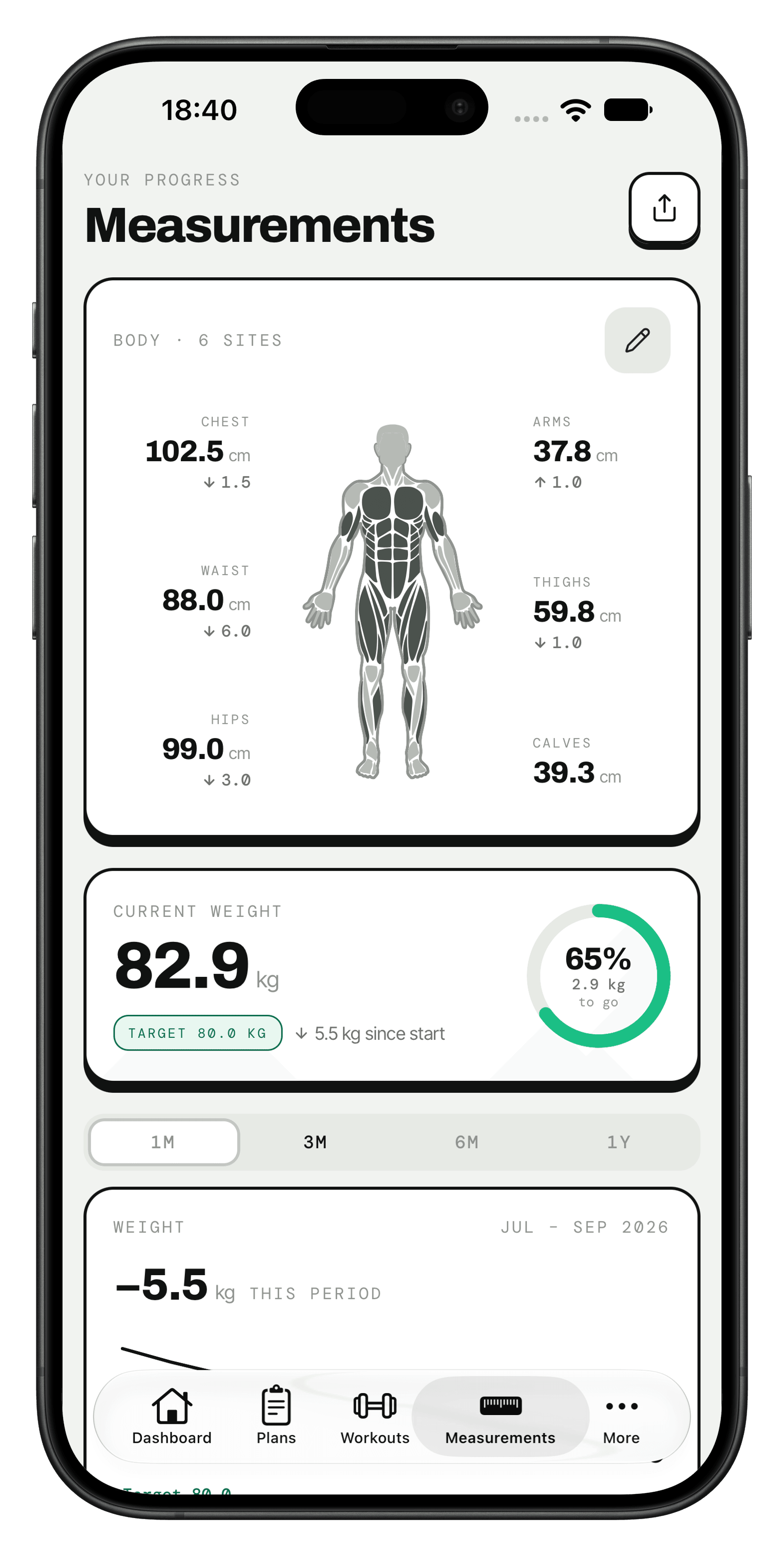
Body weight and measurements on one screen. A Strength Score out of 100 that rises when you lift more. A card to share your Strength Score and Strength Age.
05 — Apple Health
Apple Health brings in
your runs and your sleep.
Trackist reads your steps, weight, sleep and workouts from Apple Health, Apple Watch workouts included, and writes your weight back. Heart rate stays on your phone, and there is nothing to install on the watch.
- THE WEEK
A run keeps the week
Momentum counts the weeks in a row you moved. One finished session keeps a week, and so does one day with 20 minutes of movement outside strength sets. A run, a ride or a swim recorded in Apple Health, from your watch or another app, counts toward those 20 minutes.
- THE NIGHT
Slept badly? Train lighter today
Before the first set, Trackist asks how you slept, and with Apple Health the answer starts from last night's sleep. After a night under 6 hours, or when you rate your sleep low, it offers a lighter session: one set fewer on each strength exercise that has more than one, 30 seconds more rest and no finisher, at the same weights. Low energy or soreness where you train today does the same. It changes today only, and one tap puts the full session back.
- THE PLAN
The coach knows you run
Trackist fills a planned cardio finisher or rest-day walk from a matching workout, with its time and calories. Run 2 days a week on your own, and the coach sees those runs when it writes your next plan.
06 — The app
Nothing on screen
but the training.
The plan you follow, the session you log, and the summary when you finish.
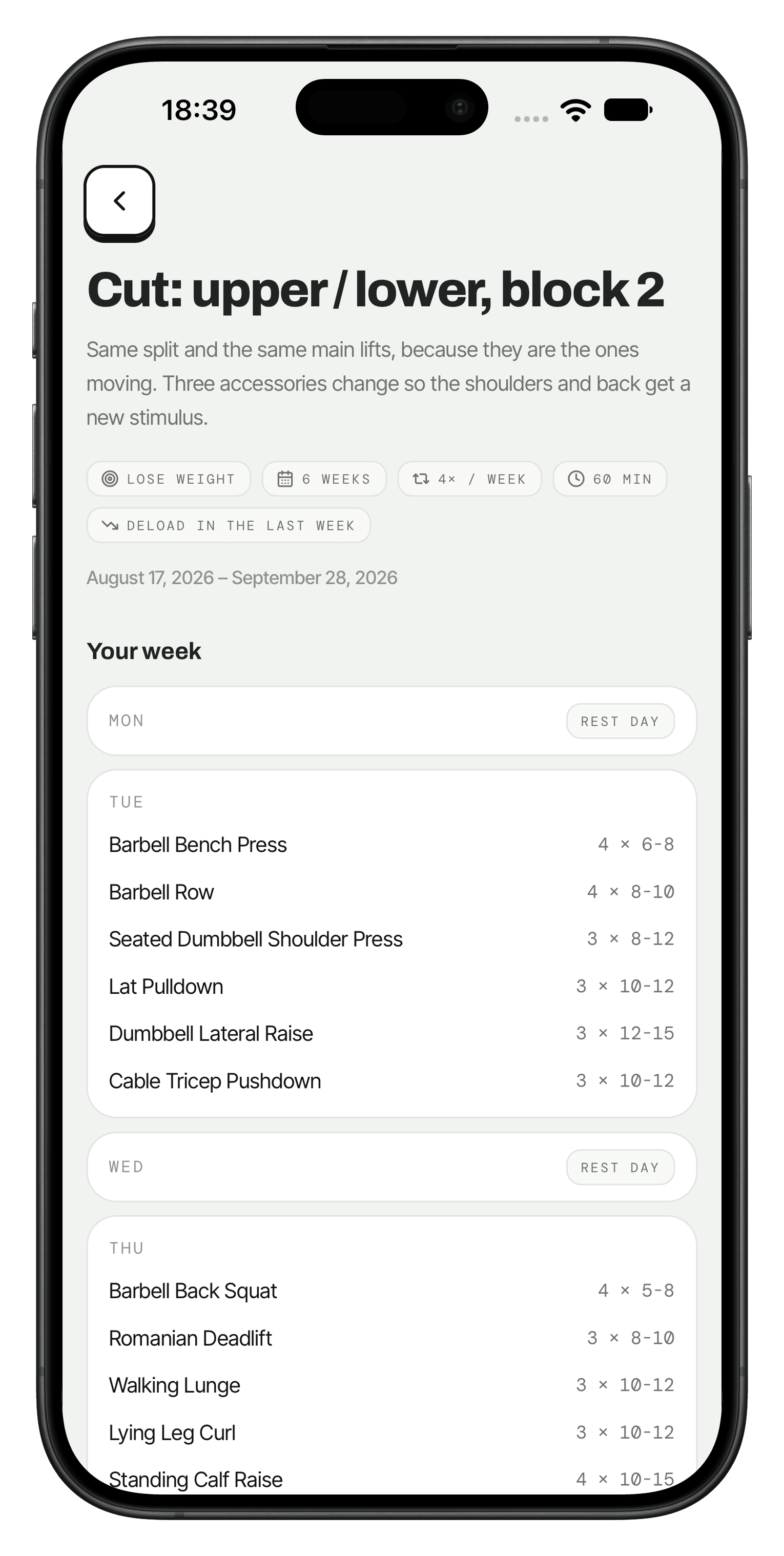
THE PLAN
Every week and day, laid out
The plan opens with your goal, how long it runs and your training days. Every exercise and rep range is already there.
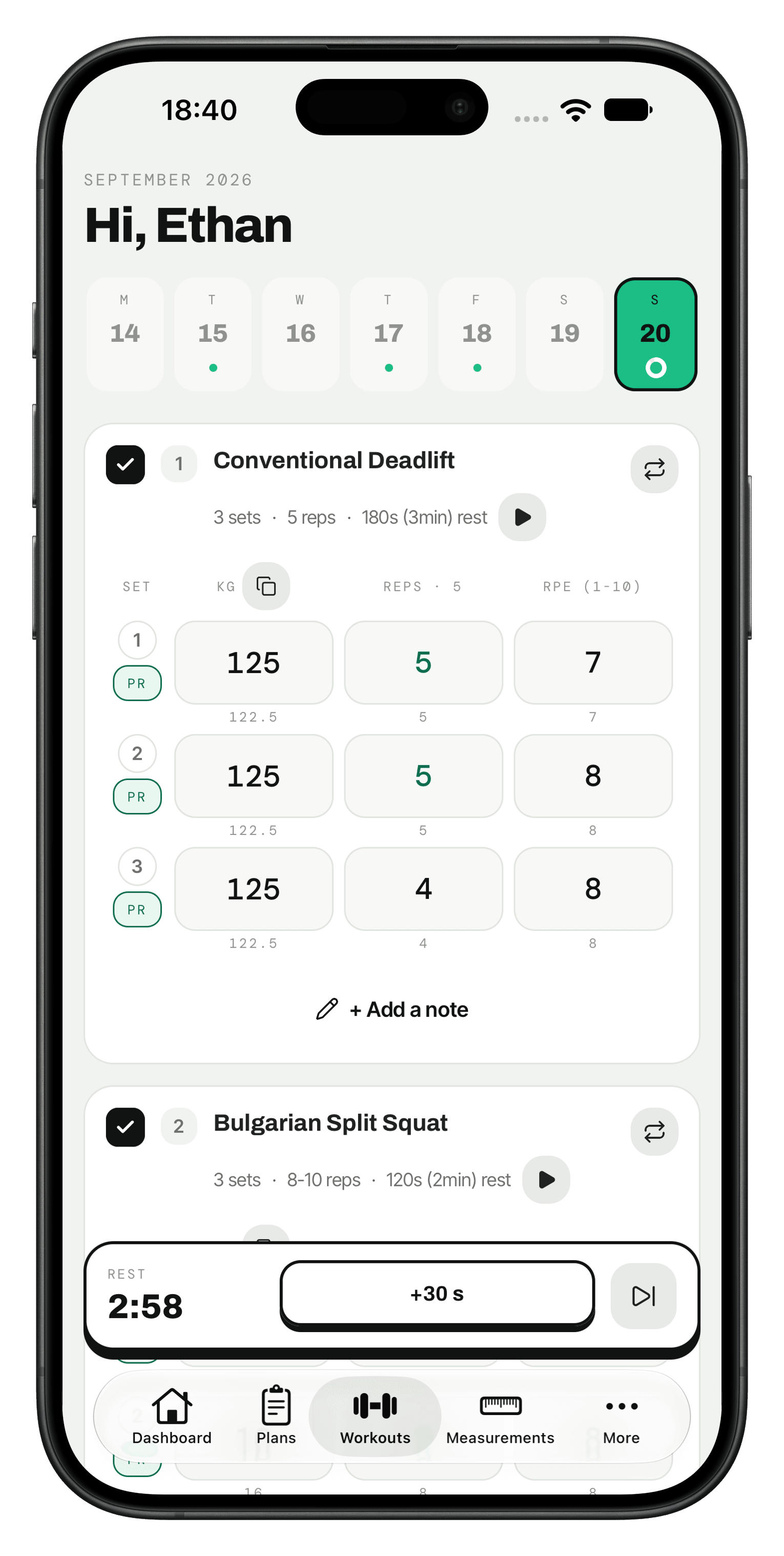
THE SESSION
Log it and get back to the bar
Weight, reps and RPE, with last session's numbers under the fields. Tap play by the rest time and the countdown starts.
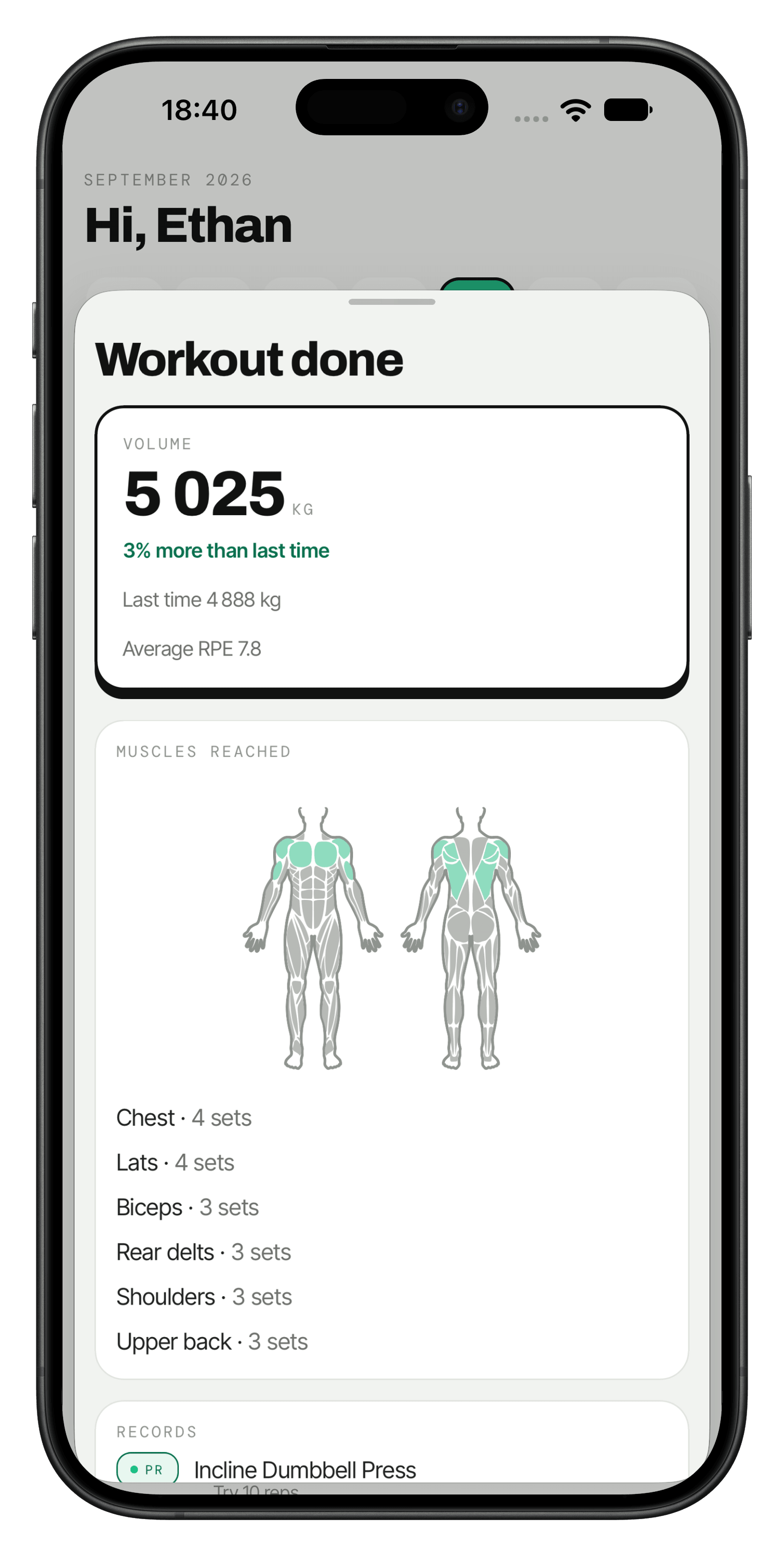
THE FINISH
See what the session added up to
Total volume against last time, the muscles you trained and every record you set.
Progress
The scale isn't everything.
Check the tape too.
Body weight, goal weight and nine measurements on one screen, with the change since you started for chest, waist, hips, arms, thighs and calves. At the end of each week you train or move, a recap of what you did.
- Body weight against the goal you set
- Nine measurements from chest to calves, with the change since you started
- A progress card you can send to a friend
07 — Month three
Month one is easy.
Month three is the test.
A plan written once stops fitting as you get stronger. This one changes while you use it.
- WEEK ONE
The plan starts
Written from your answers and split into weeks and training days, with every exercise, set and rep target chosen. You pick a weight you can finish.
- WEEK SIX
It has already changed
The weight went up where you were ready. The exercise that hurt is gone. After you reported 2 different weeks as too hard, the rest of the plan was rebuilt.
- THE NEXT PLAN
It starts higher
Finish the plan and the next one is written from how your lifts moved. Exercises you keep pick up from the weights you logged. Month three picks up where month two ended.
08 — Your strength
One number that says
you're getting stronger.
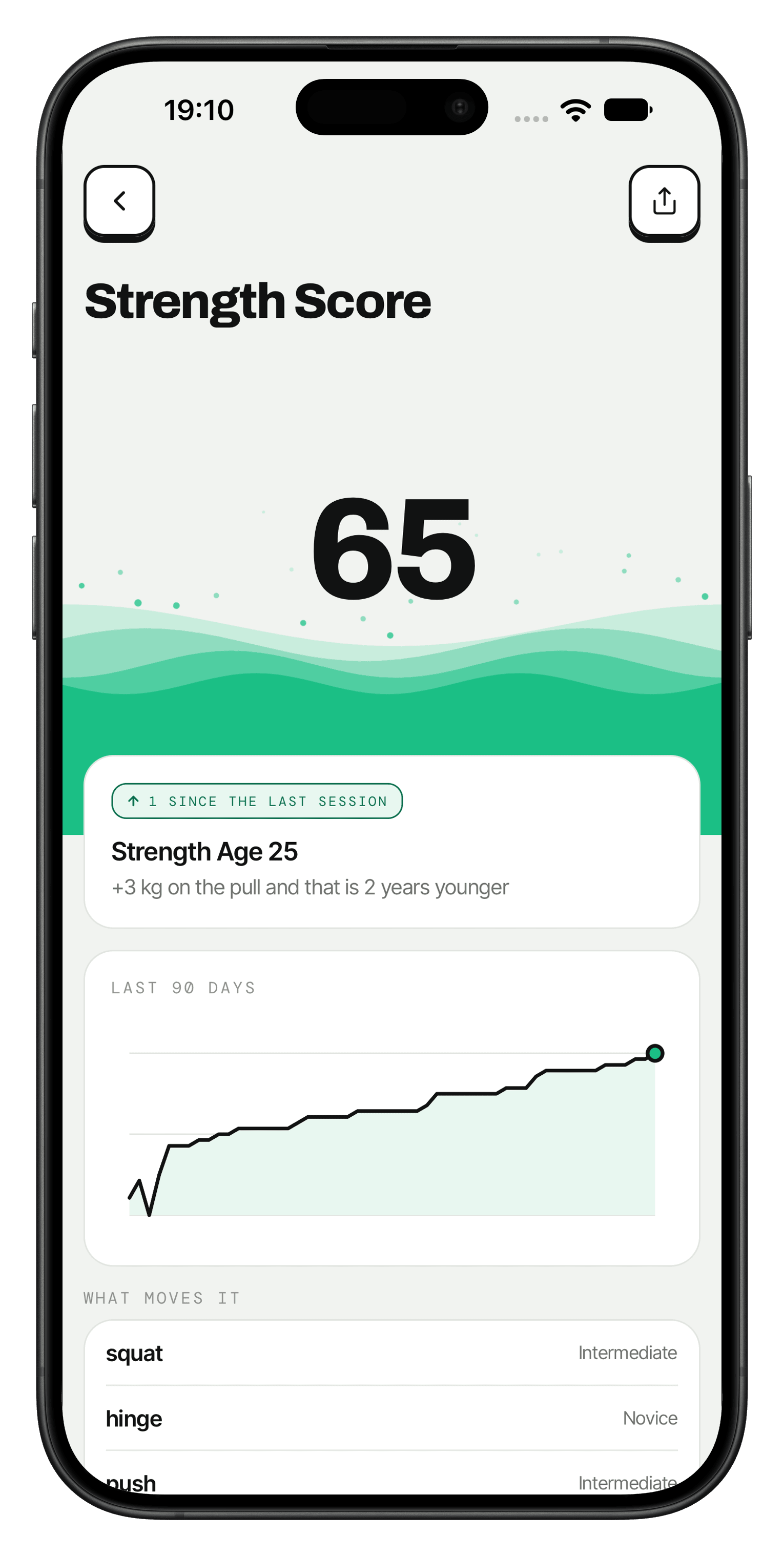
Trackist takes your squats, deadlifts, presses and pulls from the last 90 days and turns them into a Strength Score out of 100. Lift more and it goes up. Your Strength Age shows what's next.
- A score out of 100, updated after every session you log
- Strength Age, in years, from the same lifts
- The last 90 days as one line, and the lifts that moved it
Your first plan, ready in a few minutes.
5.0 ON THE APP STORE · NO ADS · IOS TODAY
09 — Reviews
Every review so far: five stars.
- ★★★★★
The ultimate game changer app
From the moment I signed up, I was impressed by how clean and modern the interface is. There's no clutter, no annoying ads. It feels premium, and navigating through the different programs is incredibly smooth.
ResultsDriven999 · April 2026
- ★★★★★
Clean and actually useful
Really like how simple Trackist feels. Logging workouts is quick, the plan layout makes sense, and it helps me stay consistent without overcomplicating everything.
Emil_yyy · April 2026
- ★★★★★
Super
A great app, really helpful and clear, even for a beginner like me who's just starting out with training. Highly recommend.
Ksycbekd · March 2026
- ★★★★★
It's simply the best
Great one. Really valuable, easy in use, keeps me focused on training without unnecessary distractions. Love it.
ArmRingus · March 2026
- ★★★★★
A revolution!
Exactly what I was looking for: clean design, and I can finally track my progress. Really worth it!
Karol the Architect · March 2026
- ★★★★★
The best of the best
Amazing. I recommend it with all my heart. An app like this was exactly what was missing.
SerQles · November 2025
10 — The alternatives
A notebook, a template
or Trackist?
What you use now, and what happens when the week stops going to plan.
Who writes it
When you get stronger
When the rack is taken
When a session goes badly
11 — FAQ
Questions, answered.
What to know before you download, in plain words.
Still stuck? Email supportWhat is Trackist?
Trackist is an AI personal trainer for the gym, on iPhone. It writes a plan around your goal, experience, equipment and anything that hurts. From the sets you log, it suggests what to lift next, and it keeps your sets, measurements and records in one place. Its library of 240 movements runs from barbell lifts to HYROX stations and gymnastics.
How does it build my plan?
Trackist builds your plan from 14 questions: your goal, experience, equipment, the days you can train, how long a session can be, your age, and which joint hurts and on what movement. It turns your answers into a plan for the next 4 to 12 weeks, with every exercise, set, rep target and rest already chosen. The plan is ready as soon as you sign in after the questions, and your first session can be today.
Does the plan really change?
Yes, your Trackist plan changes as you train. From your second session of an exercise, it suggests today's weight, worked out from your last sets. Slept under 6 hours, or sore where you train today? Trackist offers a lighter session for today: one set fewer on exercises with more than one, 30 seconds more rest, same weights. Tell it your shoulder hurts on an exercise and you get a swap that spares the joint. Say sessions are too hard or too easy, then say it again in a later week, and the coach rewrites the day or the rest of the plan. When the plan ends, the coach writes the next one from how your lifts moved.
What can I track?
Trackist logs every set with weight, reps, seconds or metres, and RPE, which is how hard the set felt on a scale of 1 to 10. Pull-ups, dips on bars and push-ups count the body weight you lift, and one-arm or one-leg work reads per side. A record is marked the moment you beat your previous best. You can also track body weight against a goal and 9 measurements, with the change since you started for chest, waist, hips, arms, thighs and calves. Your Strength Score and Strength Age move with the sessions you finish, and Momentum counts the weeks in a row you trained or moved.
Does it work with Apple Health?
Yes, Trackist works with Apple Health. It reads your steps, body weight, sleep and workouts, including the ones your Apple Watch records, and writes your weight back. Last night’s sleep starts your answer to the sleep question before the first set. Workouts count toward Momentum and your weekly recap, and a matching one fills a planned cardio card with its time and calories. Heart rate stays on your phone.
Is it on Android?
Not yet: Trackist is iPhone only today, from the App Store. The Android app is being built.
What does it cost?
A Trackist subscription costs $9.99 a month or $49.99 a year, with the first 7 days free. You download it from the App Store. There are no ads.
12 — Guides
Start with a plan or a guide
Workout plans with every set and rep, and short guides that each answer one question.
- GuidePHUL vs PHAT: which one should you run?Run PHUL if you have 4 days and want strength and size equally. Run PHAT if you have 5 days, long sessions and good recovery, and size matters more. Here are the sets per muscle, session lengths and who each one suits.
- GuideHow to break a training plateauA plateau is rarely a strength problem. It is usually recovery, effort, or a plan that stopped changing months ago. Here is how to find which one you have, and the order to fix them in.
- GuideDeload week: when to take one and what to cutA deload week keeps the weights and cuts the sets to about 60%, and Trackist plans one as the last week of a plan of 6 weeks or more. It is not a week off and not a reward. Here is when you need one and exactly what to change.
- Workout planPush pull legs (PPL) workout planA 6-day push pull legs workout plan with every exercise, set and rep, how to add weight, and what to do when a lift stalls. Log every set in Trackist.
- Workout planFull-body workout plan for beginnersA 3-day full-body workout plan for beginners: 2 alternating sessions, basic barbell lifts, sets and reps, and a simple rule for when to add weight.
- Workout planUpper/lower workout splitA 4-day upper/lower workout split with both upper and lower days, every exercise with sets and reps, and a clear rule for adding weight over time.
13 — Get started
Stop repeating the same week.
Start adding weight.
No ads · Plan ready in minutes · On iPhone